Week 7 – User Interface Visual Design Patterns

The user interface of a designed interactive product is the means in which the user and system interact through visual means due to a screen display. The user interface is not just about the visual appeal but presenting the user the input tools required to accomplish a task and achieve their goals. The user interface (UI) is the connection between the user and their experience and can have a lasting impression on the user either in a positive or negative way. The user interface is used to guide the user through the experience and the way that it is done is important as the experience needs to be easy to follow and engaging. The UI design is heavily dependent on the previous step in the design process which is the user scenario description where having a good knowledge of the user and how they interact with the device can determine the make or break of an interactive.

The user interface is the connection between the product and the user experience (UX). The User experience is about how the user enjoys using the website, app, kiosk etc and is determined by the interactive features and visual design of the interactive which is the UI. Ensuring a successful user experience is determined by the look, feel and usability of the interactive determined by navigation patterns consisting of Tabs, menus, carousels etc. Navigation is what is what determines how a user travels through an interactive and forms as part of the user interface so using the right navigational items to best work for the user, interactive and screen designs are essential.

Types of navigation

Tabs: Tabs are a commonly used navigation pattern and relate to the real world example of tabs used in a filing cabinet to make it easy to fined certain content and keep it organised. Tabs separate content into sections and used for a flat navigation structure providing the user with a clear indication of the content location with a labeled tab. Tabs are used on webpages when there is between 2 to 9 sections of content and is organised into tabs due to the site being unable to reveal all the content on the entire page.

Figure 3: Waterson, S. (2019). [Image]. Retrieved from https://vimeo.com/319376545

Dropdown menu: A dropdown menu is used to save space, organise and hide information revealing the information with the user interacts with the menu by hovering over it, clicking or touching the dropdown menu. The menu is used to hold between 2 to 9 sections of information that require a hierarchical navigation structure.

Figure 4: Waterson, S. (2019). [Image]. Retrieved from https://vimeo.com/319376545

Fly-out/Drawer menu: A fly-out/drawer menu is designed to save space and allow for quick access to all key menu items at once. This type of menu can also be used as a shortcut to certain information and pages and can be used to bypass the main user pathway set out to get to the end goal quicker.

Figure 5: Waterson, S. (2019). [Image]. Retrieved from https://vimeo.com/319376545

Shortcut Dropdown: A shortcut dropdown consists of a search bar that allows for the user to activate a dropdown to access a specific section in a fast and easy way and does not involve hierarchy. It is usually used to provide a frequently used pathway that can be shortened for the user to get easy access to a specific page.

Figure 6: Waterson, S. (2019). [Image]. Retrieved from https://vimeo.com/319376545

Big Footer: The big footer allows the user to quickly access specific sections of content in an interactive by allowing the user to bypass the main navigational system or structure set at the top. The footer provides shorter pathways for the user to access certain pages with different hierarchical levels.

Figure 7: Waterson, S. (2019). [Image]. Retrieved from https://vimeo.com/319376545

Home button/Link: Every webpage must provide an easy access pathway back to the home page or menu no matter what part of the interactive the user is at or up to. The link to the home page or menu must be presented clearly to the user and must be provided on every page on the interactive. The home page link can be the interactives logo which is commonly used on branded websites at the top of the webpage that can be clicked on by the user. If an interactive doesn’t have a logo a clear button that is labeled ‘Home’ must be provided instead or as well as the logo. If there is more then one home page then there must be a distinctive link between the local and main home page.

Figure 8: Waterson, S. (2019). [Image]. Retrieved from https://vimeo.com/319376545

Breadcrumbs: Breadcrumbs are used when the user needs to know their location in a websites hierarchical structure and provide the option for the user to travel back through the breadcrumbs. The breadcrumbs are used to inform the user their location throughout the entire sites hierarchy and a way to trace every step they have taken to get to the point they have arrived at in the site. This allows for the sites structure to be easily understood as it takes up minimal space and hint the structure and location of the pages. Breadcrumbs are used when the structure of the site is broken up into sections and divided into subsections which build up a sites complexity which can make the websites structure confusing. Breadcrumbs are used when the user has most likely arrived on a webpage that was provided by an external source. Breadcrumbs are used with other types of navigation and are never used as the main source of navigation it is recognised as a sub form of navigation.

Figure 9: Waterson, S. (2019). [Image]. Retrieved from https://vimeo.com/319376545

Carousel: A carousel is used when the user needs to browse through a set of items and need to select a specific one. A carousel organised a large set of items to be shown and scrolled through similar to a slide show. The carousel allows the user to focus on only an item or a few items at a time and allow the user to know that there are more items available. It is used when there is not enough space to show all the items at once as the items displayed are only visual items that can be used to displayed products and posters etc.

Figure 10: Waterson, S. (2019). [Image]. Retrieved from https://vimeo.com/319376545

Navigation is a critical part of designing a successful interactive product/system as navigation is the main use of interactivity that allows the user to explore content. Making sure the right navigation is used for certain features in an interactive is important for a successful interactive and that is all determined by the content, context and the type of user. Successful navigation is what makes up the user interface look and feel and the user experience an enjoyable experience for the user.

Week 6 – User Scenarios

User Scenarios are a narrative of how a person will engage and interact with the interactive within a specifics contexts. A user scenario is used to predict how a type of user responds in a certain situation and how it impacts the overall process and outcome when using the interactive. The user scenarios are built on from the user personas which provide information on the type of user that is being considered for the interactive and from the information to work out how they will complete certain tasks. The User scenario allows the designer to consider all the success and failures when looking at the multiple user scenarios and the outcome from the scenarios. The designer is then able to change, remove or alter a certain function or feature in the design by isolating the problems to make it more successful after reviewing the scenario outcome.

Figure 1: Waterson, S. (2019). [Image]. Retrieved from https://vimeo.com/319376412

User Scenarios must take into consideration the who, what, when, why and how the user will interact with the device. The scenario must track the different behaviours of the user and describe the interactions of the types of uses with the interactive. The scenario must take in consideration the goals, expectations, intentions, actions and how the user will react when using the interactive. The user scenario is neither a prediction or plan for how the user will interact with the device and more of a reflection on how the interactive will be used in the context of everyday activity. It will look into each persons typical day, common problems they have and questions they ask.

Figure 2: Waterson, S. (2019). [Image]. Retrieved from https://vimeo.com/319376412

A User Scenario must consist of multiple steps that the user will undertake when engaging with the interactive. It must take in consideration the problem, persona and the context of use. Scenarios are what drive the development of the functions, interactions and visual design of the interactive in order for the user to succeed in achieving their goals of the user. The interactive must be designed in consideration of the user scenarios in order for the design to be successful, all visuals, text and layout should be tailored towards a successful scenario.

Tutorial Activity: Mapping out User Flow Through the interactive Kiosk

Week 5 – User Personas

When designing an interactive product the user is the always considered first before going ahead and designing the product. The user is the purpose for why the an interactive is bing designed so it is important that the interactive is designed to be suitable for the specific user or group of users the product is being designed for. The users needs and objectives determine the function and content required that lead to the interaction design and information architecture that leads to the visual design. It is important to identify the users properly as the knowledge of the user has an overall effect on the entire project.

Figure 1: Waterson, S. (2019). [Image]. Retrieved from https://vimeo.com/319375751

User personas are a fictional representation of the real users that will engage with the product. The overall personality including the users age, gender, goals, behaviours, attitudes, cultural backgrounds, likes and dislikes of a hypothetical group of users is all considered in a user persona. Personas are developed from data collected from users with descriptions of their personality, environment of product usage and context. The goal of a user persona is to understand the mind set and behaviour of type of people who will be using the product being designed. Personas allow the designer to design with a product with a clear understanding of the user in mind.

Figure 2: Waterson, S. (2019). [Image]. Retrieved from https://vimeo.com/319375751

It is important to make sure that the designer considers a core audience that the interactive is purposed for to make sure that the design is will be suitable and work well for that audience primarily. It is also important to broaden the scope and look at general features that can make the interactive more applicable to a wider range of users and work out ways to best work for a larger group without making it any less effective for the primary users that the product is being designed for.

A user persona should identify how a user will perform a certain task and how they will get to the end destination. All users are different and will have different ways in going about how they get to the desired destination or achieve a certain objective. It is important to develop multiple paths and methods that users can follow to work for different user mindsets. Some users may want to explore and browse a website or app whilst other users may want to find a specific thing they are looking for, designing options for exploration is important and users also need to have the opportunity of alternate routes to get to the outcome faster. It is important to understand the different devices the personas are using as well as certain age groups will be involved in using certain devices over others for example teenagers and young adults will use mobile devices more often compared to middle age and more senior adults.

Figure 3: Waterson, S. (2019). [Image]. Retrieved from https://vimeo.com/319375751

It is essential to understand the two main approaches to designing an interactive for users which is knowing if the interactive is task dependant or user dependent or both. Task dependent interfaces are designed for user discovery and have a specific path designed for the user to follow to a certain outcome. A user dependent interactive is designed for the user to be free to search and explore what they are seeking to find and choose how they can go about it. User interfaces can also be both task and user dependent depending on what the interactive is about and is inclusive of the different types of users.

Artefact Personas

Artefact personas are developed after the creation of user personas. The artefact persona is the description of the personality of the interactive product being designed and how it will engage with the users. The Artefact persona proposes the visual style and design of the product, the personality, impressions on the user, the type of approach for example, content or image focused, type of language used etc. Artefact personas are important as the personality of the interactive can determine how and who will use the interactive and how well will the users engage with the interactive. Interactive designs are become more are more relatable to people which is why the personality is important for example a product designed for children should have a child like personality through the use of colour, visuals, text and the type of language use, sound etc where as an interactive design for a middle age adult will consist of a more sophisticated approach. An interactive designed for specific genders, interests or different intellectual people will all have an artefact that will have a personality that will best fit for that type of user.

Artefact personas are important to make the user feel like they are talking less to a machine and more towards a person and type of person they are comfortable talking to. Artefact personas are usually created by investigating the user group being targeted and asking them what type of characteristics they like in a certain user relating to the context of what the interactive is being designed for. The best way to develop an artefact persona is to collect a range of key words that describe the personality and break it down to a specific set of key words that sum up the personality that would be best suitable. From the certain keywords and personality descriptions the designer can then go ahead to design the interactive with the interactives personality in mind. An artefact persona is also a good way to check and look back on to critique the design to see if the interactive has fulfilled the desired personality.

Understanding the user is essential when designing an interactive product so it is important that user personas and artefact personas are taking into careful consideration.

Tutorial Activity: Writing up User Scenarios

Studio activity: Developing a site map for the interactive Design Project

Draft site map

Site Map

We interact with instructions every day in many different ways throughout our lives. Instructional design comes in many different forms to the types of instructions on how to use a machine, product, software or service, how to make, build or customise a product or to providing directions to follow etc. Instructions are used in our everyday life to guide us in a direction to in order to achieve an end goal. Instructional design is important to make tasks easier to follow if a user doesn’t know how to achieve a certain task. It is important to take into consideration cultural differences when developing instructional design as certain things can be interpreted in a different ways so if an instructional design is to be used universally it is important for it to be understood by all different cultures.

Figure 1: Cmielewski, L. (2019). [Image]. Retrieved from https://vimeo.com/319375981h

Cognitive load theory is the way we think and how we remember and our working memory is how we manipulate information stored in short term memory. It is important when designing instructions that designers take into consideration in how people remember information for a short period of time. If instructions require the someone to read blocks of information the reader can easily forget what instructions were told at the start and get lost in the process. Keeping instructions simple and having an easy step by step process which is often assisted with or consists of visuals to ease understanding is important for the ease to follow instructions.

Figure 1: Cmielewski, L. (2019). [Image]. Retrieved from https://vimeo.com/319375981h

The use of simple graphics is important to isolate important detail and direct the reader to the most salient point to aid understanding of what is being explained. Simple graphics work well as they are minimal and allow the reader to see exactly what they need to do whereas more complex graphics can lead the reader to getting lost due to there being too many visuals to look at. It is important to visualise what is necessary and make it clear to the reader what it is that they need to do. Simple graphics usually consists of a limited colour palette where the main points are highlighted and stand out from the rest of the graphic.

Figure 1: Cmielewski, L. (2019). [Image]. Retrieved from https://vimeo.com/319375981h

Types of interactions

Instructional: Usually consists of pressing a button and tells the user exactly what and how to do something.

Conversational: Back and forth dialogue where the user or device asks questions and allows the user to provide specific details which generates a response specific to the user. There are multiple variables and different answers/outcomes.

Figure 1: Cmielewski, L. (2019). [Image]. Retrieved from https://vimeo.com/319375981h

Manipulation: Drag and drop elements can be used and there is freedom to customise and change the structure and appearance of a program and can also allow for creativity.

Exploration: The user is provided with multiple options to chose, they can have a playful game like experience, follow an objective/s and chose how they can get there without a strict guide to follow. This form of interaction allows for user freedom to choose how they get to a certain outcome.

Figure 1: Cmielewski, L. (2019). [Image]. Retrieved from https://vimeo.com/319375981h

Interactive design through a digital form provides many opportunities as well as challenges. The opportunity of digital media over print allows the ability of time to be used which allows for motion an animation to be implemented and used in design. It also allows for the ability to hide and reveal information and have multiple layers. The challenges of Digital media is there is the limitation of screen sizes and resolution eg: mobile devices provide limited possibilities where scrolling is required compared to a desktop device and what can be displayed on an A3 as such.

Interactive media should provide the availability of information and choice for the user to explore the information freely of what information they want to explore. Interactive designs should provide the option of redundancy where the user can use shortcuts and alternate options to the provided basic keys/instructions an interactive provides. Interactive media should allow the user to feel a sense of control and freedom without having to be forced down a specific path that an interactive provides.

Tutorial Activity – Ideation

Studio Activity – User Personas and Journeys

Week 4 – Instructional Design

Week 3 – Design Patterns

Understanding how to create effective Design Patterns is an important factor when designing for interactivity as Design Patterns influence how a user engages and navigates through an interactive. Poor and inappropriate use of design patterns for an interactive can result in the failure of the users navigation through an interactive, it can be unappealing and fail to engage the users and make the process a struggle. The most important factor in creating the right design patterns for the interactive is to know the context and purpose of the interactive which was explained in the previous post. Design patterns can in many forms and it is essential to use the right pattern for your interactive in order for it to be a success.

The first thing that needs to be considered is if you are designing a website and if you want it to be mobile responsive. Mobile responsive design has become a very popular form of design recently due to the introduction and overwhelming use of smartphones. Websites are now being designed to not only work functionally on a desktop and laptop but also on a mobile phone and tablet with a format that works effectively for each screen size. The most common way to design in a responsive format is to design mobile first. To design mobile first is to design and interface that works best for the smaller screens then work the way up to the larger screens. Designing mobile first allows the designer to prioritise the features they include in the design that will be effective on all screens.

Figure 1: Waterson, S. (2019). [Image]. Retrieved from https://vimeo.com/319375751

Architect Christopher Alexander discusses design patterns in his book Design Pattern Language which focuses on patterns of design in all areas from cities, gardens, buildings, interiors, furniture, fixtures etc. His book focuses on how words describe patters supported by drawings and infographics instructing methods on how to develop safe, practical and aesthetic designs. His book emphasises how design patterns go beyond style and aesthetics and more towards function and individual engagement with the environment.

Figure 2: Waterson, S. (2019). [Image]. Retrieved from https://vimeo.com/319375751

User interface (UI) patterns

Websites have a lot of similar user UI design patterns as design has matured over time to develop a very effective form of UI that works across many types of websites. UI patterns today have little in terms of innovation but there is no real need to reinvent patterns if these common UI patterns function well in engaging and guiding the user through an effective, functional and successful experience.

Types of User interface patterns

Hamburger menus: A Hamburger consists of a button with the icon with three lines stacked on top of each other to resemble a hamburger. The symbolic meaning behind this is a Hamburger is what holds everything together. A Hamburger menu acts as a button to reveal a menu with links to different pages for the user to navigate as this way the menu saves space on the webpage. The Hamburger menu is usually positioned in the top left or right hand corner of a page visible but out of the way of the content on the page. The hamburger menu can be used to reveal hidden information by tapping or dragging the button and tapping back on the button to close the menu.

Account Registration: Account registration is a form out or a button to allow the user to link a social account or to sign up. Multi – step forms are used to break up information into multiple steps and complete one step at a time to make the form process less overwhelming and easy for the user to follow through the process.

Long Scroll: A long scroll is used to lure users through storytelling and keeps the number of pages as small as possible.

Figure 9: Waterson, S. (2019). [Image]. Retrieved from https://vimeo.com/319375751

Cards: Cards are a form of multiple squares on a webpage which consist of a title, icon, an image and a small amount of text as a description. Cards act as small webpages providing a link to the page with the full article/information.

Figure 10: Waterson, S. (2019). [Image]. Retrieved from https://vimeo.com/319375751

Hero Images: Hero images are positioned above the scroll with text over the top of the Hero Image. Hero images allow for the rest of the webpages content to be loaded and act as landing image when the user enters the website.

Figure 11: Waterson, S. (2019). [Image]. Retrieved from https://vimeo.com/319375751

Animation: There are Two types of animation used for interactivity which is large scale animation and small scale animation. Large scale animation consists of animation as an interaction tool for example hovering over an icon and the icon changes shape/colour, size etc. Hover animations are used to inform the user of the function if the users are unsure what the function is. Navigation menus consist of animation to reveal menus for the user. Galleries and slideshows use animation to present a portfolio or reveal products etc. Small scale animation doesn’t require user engagement for example loading icons which are used to entertain the user as they wait for a webpage to load.

Motion Animation: Motion animation is used to draw users attention, assist in visual hierarchy, call for an action and reveal menu items. Scrolling is a common form of motion animation as smooth scrolling provides ease to the user exploring the webpage.

Figure 14: Waterson, S. (2019). [Image]. Retrieved from https://vimeo.com/319375751

Material Design: A form of clean design focusing on the user experience.

Figure 15: Waterson, S. (2019). [Image]. Retrieved from https://vimeo.com/319375751

Responsive Design: A simple and a cheap way for businesses to build a fully functional mobile responsive website that works on all formats. Responsive design consists of collapsing of content as screen sizes become smaller. For example a set of panels are presented horizontally on a desktop has all of the panels stacked on a mobile device. The issues with responsive design is the performance of the website and the restriction on visual features that can be used on a large screen as it is designed mobile first.

From all of these examples of Design patterns you should now be informed of the different ways you can approach the design of an interactive project. Be aware to only use the features that are relevant to the what you are designing for as not all features will work well for what you are doing. Do research and take care when applying specific design patterns to an interactive.

Tutorial Activity: Plan/Pitch for Interactive Design Project

Workshop Activity: Wireframing the interactive website for how to make toast

After developing the site map in the last activity I then went ahead to wireframe the website. Taking in consideration the different design patterns I learned about this week it was important to work out the best user patterns to use for my website prototype. These design patterns are applied through my wireframes for the activity.


Workshop activity continued: Screen designs

After the development of the wireframes I then used the wireframes to create the final screen designed which would then be used to be prototyped and created as an interactive website.

Week 2 – Process and Context

The Context for use is the most important factor that interactive designers must consider when developing an interactive design project. It is essential that an interactive product is designed in consideration of the context it is used in which can determine the make or break in a successful design. Interactive Designers begin developing ideas through rough design sketches with a pencil/pen to paper or use a whiteboard and a marker, sticky notes or any form of low tech visualisation to get their ideas out of their head into physical form. This process allows interactive designers to understand the problem effectively through the development of diagrams, models and flowcharts which point out areas that are missing, form a potential direction to follow and help visualise the next stages. With low tech visualisations identifying the problems and goals the design then needs to be taken to digital form to properly visualise the plan.

References:

Figure 1: Waterson, S. (2019). Illustration by Verplank, Bill (2016) [Image]. Retrieved from https://vimeo.com/319375610

Figure 2: Waterson, S. (2019). [Image]. Retrieved from https://vimeo.com/319375610

In order to develop a successful interactive product Interactive designers must develop prototypes for people to engage and test the product. Designers then need to pose questions to the user to ask how they are finding the product to point out its advantages and design flaws in order for the design to be improved. When designing an interactive product it is important for the designer to understand WHAT the people are trying to do. HOW they may try to do it. WHAT gets in the way or helps. WHERE they might be doing it. These are all important factors that need to be considered in determining how to design in consideration of the context it is used for. For example using a companies website on a personal computer at home has a different context for use compared someone using a companies app on a mobile device outside from home.

References

Figure 2: Waterson, S. (2019). [Image]. Retrieved from https://vimeo.com/319375610

Figure 3: Waterson, S. (2019). [Image]. Retrieved from https://vimeo.com/319375610

It is important for designers to consider the situation the product is used as the setting/environment the user is engaging with the product in all has an effect. It is important for designers to question how a user will interact with the product in a public or private space, whether the product is used by one or multiple people and how many people. They need to consider how long the user will need to or will engage with the product, whether they will be able to focus on the task or be interrupted by it. whether the experience simple and how complex it needs to be. Most importantly the persons needs or goals and how they will achieve them and how will the product help them achieve it and how long will it take. Interactive designers visualise a design they need to follow a process where they must undertake primary and secondary research, map out a a plan, develop design roughs, develop prototypes and test the product all before releasing the final product to ensure a successful design.

References

Figure 5: Waterson, S. (2019). [Image]. Retrieved from https://vimeo.com/319375610

Tutorial activities

From week one I developed a flow chart on how to make toast where I mapped out all of the possibilities that needed to be considered for my interactive website for this instructional piece. Continuing on from week one I developed a series of sketches (storyboarding) visualising each stage in the process of making toast.

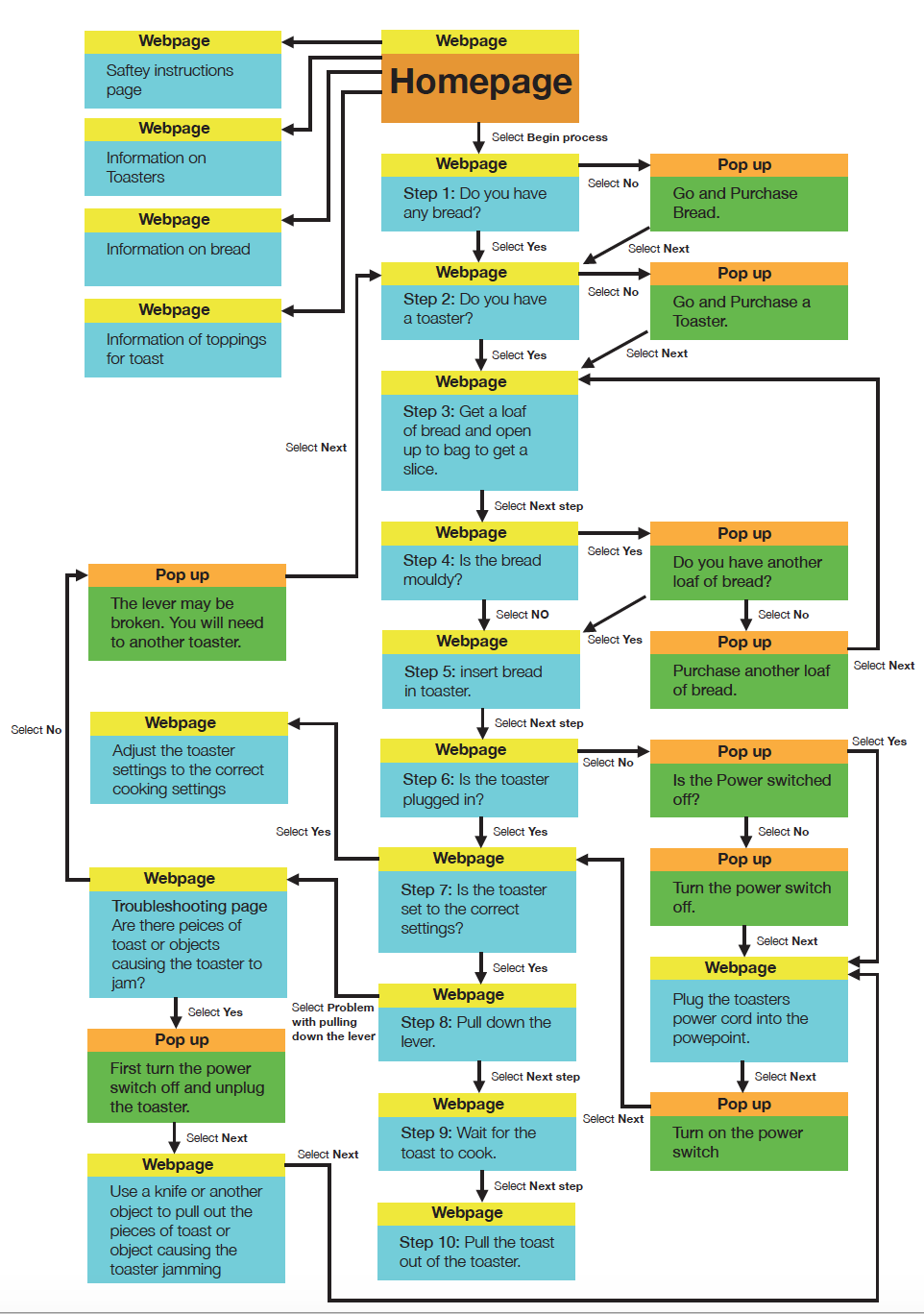
The next stage was to develop a sight map to visualise how each webpage, step and process and the way the each user would interact with website in a different way where the sight would successfully lead the user to the same outcome which is to make toast. First I developed a rough sketch of the site map to visualise how the website would turn out and solve all the problems and issues before moving to the next stage in the design process.

After developing the rough sketch I then proceeded to the digital stage where I developed a clearer and more professional version of the site map after mapping out my ideas. The site map clearly indicates the connections between webpages, pop ups on the pages and how the site will be effected by user interactivity.

Week 1 – Introduction to Interactive Design

Welcome everybody to my interactive design blog. My name is Daniel Krivacic and I am a Graphic Design student studying interactive digital media. I will be using this blog to document lecture information and design exercised I have undertaken at University. Designers or non designers you are all here to develop or deepen your understanding about interactive digital media where this blog will help you understand what interactive design is, how it effects the user/audience, the processes a designer undertakes in developing interactivity and much more. I will also show you examples of interactive design works to create a deeper understanding of ways interactivity and design take place.

Interaction Design is Design for people where the designers focus is directed towards how the user will interact with a designed product, system or form of information which influences the outcome of what is developed. Designers need to work out the easiest and most efficient ways for the user to interact with what is designed to ensure the success. Interaction Designers have to question how users DO things and effect the world, FEEL through receiving feedback from the world and KNOW through understanding certain processes. Interactivity relates to how a system or product responds to the users engagement where both the user and product/system both contribute to a certain outcome.

Interactivity is determined by the amount of control the user/audience has over the product, tools, content etc and the amount of options the user/audience has. All forms of user interaction has a certain amount of involvement where the more involvement the user has the more interactive the product/system is. Experience Design determines how data becomes meaningful information through how its visually presented and organised in order for the data to be provided for others to gain knowledge. It is necessary for a designer to understand the user/audiences needs, interests, abilities, knowledge and expectations in order to successfully design for user interactivity.

Interaction design is used in every area which user engagement occurs. Below are Diagrams describing the areas where interaction design is used.

Waterson, S. (2019). Interaction Design Infographic by Clement Mok [Image]. Retrieved from https://vimeo.com/319375480
Waterson, S. (2019). Interaction Design Infographic by Sharp, Rogers and Preece (2002) Interaction Design [Image]. Retrieved from https://vimeo.com/319375480

Information Sourced from

Waterson, S. (2019). GDIDM_POD01a Lecture POD 1 – Graphic Design: Interactive Digital Media [Video]. Retrieved from https://vimeo.com/319375480

Tutorial Activity: Designing flowcharts for users to understand and follow processes. We all follow simple and complex processes in their everyday lives in everything that we do. Some processes are simple everyday activities where we do not even think and just do due to our minds being geared into routine. These two flowchart designs describe 2 simple tasks that we humans undertake and not notice the basic steps we take to undertake these processes.

These diagrams are designed for readers to follow through each step in the process and direct them towards a successful outcome. breaking up each stage into small steps and visual features makes it easy for the reader to follow through the process without getting lost in the process as compared to paragraphs of information describing the instructions.