The Context for use is the most important factor that interactive designers must consider when developing an interactive design project. It is essential that an interactive product is designed in consideration of the context it is used in which can determine the make or break in a successful design. Interactive Designers begin developing ideas through rough design sketches with a pencil/pen to paper or use a whiteboard and a marker, sticky notes or any form of low tech visualisation to get their ideas out of their head into physical form. This process allows interactive designers to understand the problem effectively through the development of diagrams, models and flowcharts which point out areas that are missing, form a potential direction to follow and help visualise the next stages. With low tech visualisations identifying the problems and goals the design then needs to be taken to digital form to properly visualise the plan.

Figure 1 
Figure 2
References:
Figure 1: Waterson, S. (2019). Illustration by Verplank, Bill (2016) [Image]. Retrieved from https://vimeo.com/319375610
Figure 2: Waterson, S. (2019). [Image]. Retrieved from https://vimeo.com/319375610
In order to develop a successful interactive product Interactive designers must develop prototypes for people to engage and test the product. Designers then need to pose questions to the user to ask how they are finding the product to point out its advantages and design flaws in order for the design to be improved. When designing an interactive product it is important for the designer to understand WHAT the people are trying to do. HOW they may try to do it. WHAT gets in the way or helps. WHERE they might be doing it. These are all important factors that need to be considered in determining how to design in consideration of the context it is used for. For example using a companies website on a personal computer at home has a different context for use compared someone using a companies app on a mobile device outside from home.

Figure 3 
Figure 4
References
Figure 2: Waterson, S. (2019). [Image]. Retrieved from https://vimeo.com/319375610
Figure 3: Waterson, S. (2019). [Image]. Retrieved from https://vimeo.com/319375610
It is important for designers to consider the situation the product is used as the setting/environment the user is engaging with the product in all has an effect. It is important for designers to question how a user will interact with the product in a public or private space, whether the product is used by one or multiple people and how many people. They need to consider how long the user will need to or will engage with the product, whether they will be able to focus on the task or be interrupted by it. whether the experience simple and how complex it needs to be. Most importantly the persons needs or goals and how they will achieve them and how will the product help them achieve it and how long will it take. Interactive designers visualise a design they need to follow a process where they must undertake primary and secondary research, map out a a plan, develop design roughs, develop prototypes and test the product all before releasing the final product to ensure a successful design.

Figure 5
References
Figure 5: Waterson, S. (2019). [Image]. Retrieved from https://vimeo.com/319375610
Tutorial activities
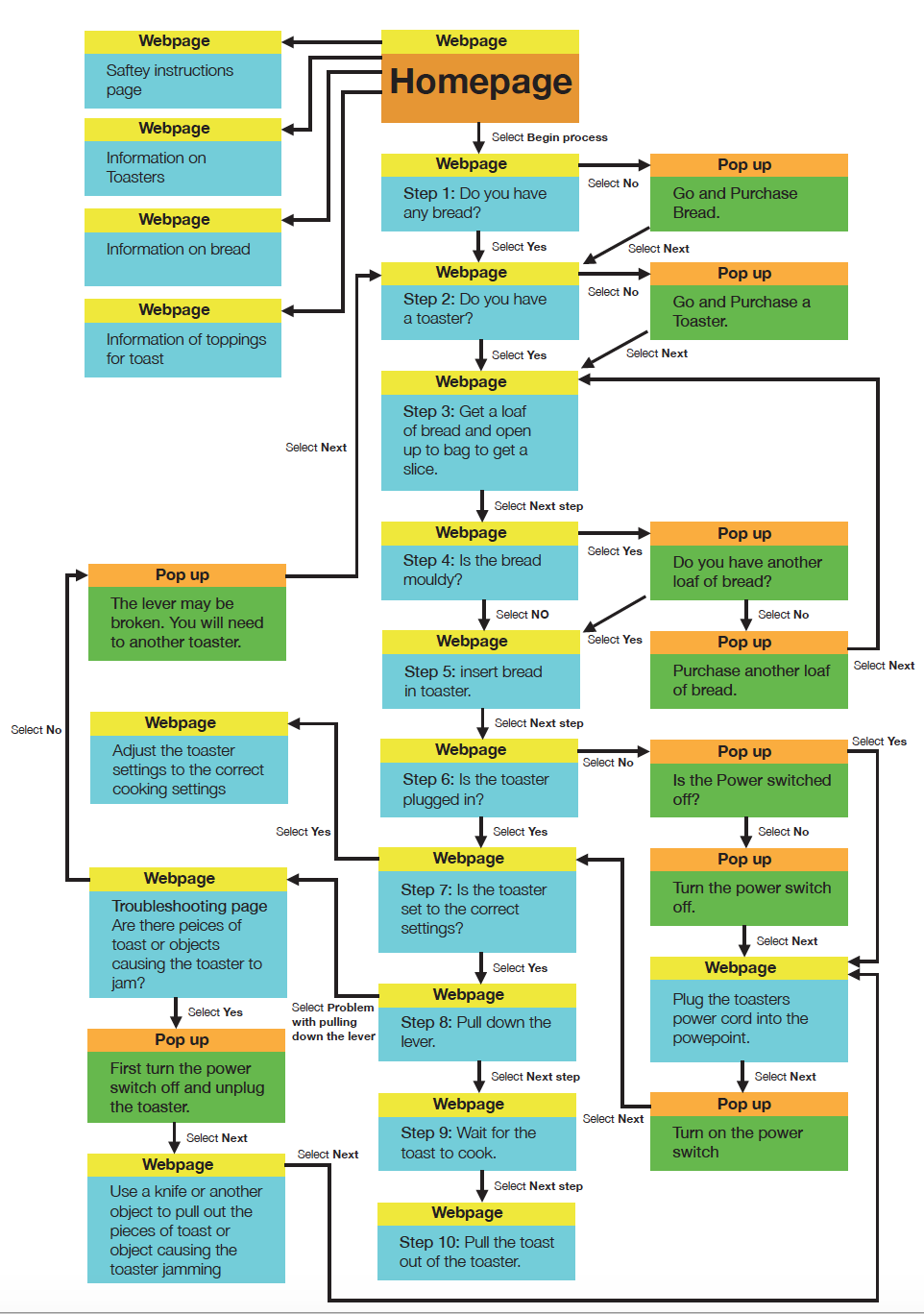
From week one I developed a flow chart on how to make toast where I mapped out all of the possibilities that needed to be considered for my interactive website for this instructional piece. Continuing on from week one I developed a series of sketches (storyboarding) visualising each stage in the process of making toast.


The next stage was to develop a sight map to visualise how each webpage, step and process and the way the each user would interact with website in a different way where the sight would successfully lead the user to the same outcome which is to make toast. First I developed a rough sketch of the site map to visualise how the website would turn out and solve all the problems and issues before moving to the next stage in the design process.


After developing the rough sketch I then proceeded to the digital stage where I developed a clearer and more professional version of the site map after mapping out my ideas. The site map clearly indicates the connections between webpages, pop ups on the pages and how the site will be effected by user interactivity.
 Designing for Interactivity